
TacticalPad Lite1.2 - Google Play
You'll be able to see results in few seconds.
Publisher Description
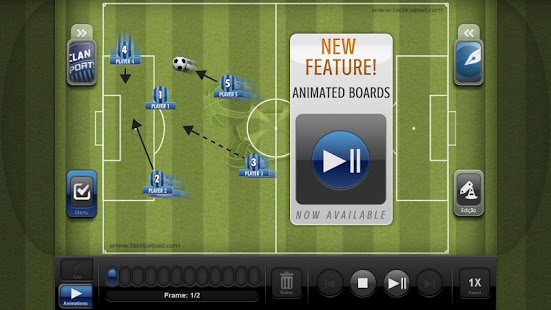
Animations now available!
TacticalPad is the most complete tool for coaches, assistant coaches, performance analyst, journalists and sport enthusiasts.
Easy to use, agile, together with Tablets’ and Smartphones’ mobility, TacticalPad is the best option for football professionals to improve their communication, resulting in better understanding in tactical discussions.
TacticalPad targets every football level, from amateur to professional, from youth development to high level. It is a competitive advantage, assisting technical staff to study and surprise opponents.
TacticalPad is not only used by football’s technical staff, but also by journalists, bloggers, teachers and sport enthusiasts. Because of its high quality graphics, it is widely used to generate content for blogs, social networks, lectures, newspapers, etc.
Check below some features and scenarios that make TacticalPad so powerful:
• Projects with multiple tactical boards
• Support for animated plays (up to 3 frames on Lite version)
• High quality graphics
• Use it in the bench, pre-match presentation, training sessions, half time talks, daily chats, home, etc. Use it anytime and anywhere.
• Digital ink support:
- Free drawing
- Lines
- Arrows
- Dashed
- Configurable color and thicknes
- Eraser
• Trainning items
• Export content to:
- Images
- Emails
- Facebook
• Supports file sharing
• Project to a TV or projector
• Team roster settings with:
- Names
- Number
- Positions
- Lineups
• Teams and players’ appearances:
- Colors
- Badge
- Jersey style
• Save and load teams
• Settings to show/hide players’ name and number
----------------------------
keywords:
Board Tactics Soccer Football Tactical Mourinho Guardiola Coach
About TacticalPad Lite
The company that develops TacticalPad Lite is ClanSoft. The latest version released by its developer is 1.2.
To install TacticalPad Lite on your Android device, just click the green Continue To App button above to start the installation process. The app is listed on our website since 2014-01-31 and was downloaded 0 times. We have already checked if the download link is safe, however for your own protection we recommend that you scan the downloaded app with your antivirus. Your antivirus may detect the TacticalPad Lite as malware as malware if the download link to com.clansoft.tacticalpadlite is broken.
How to install TacticalPad Lite on your Android device:
- Click on the Continue To App button on our website. This will redirect you to Google Play.
- Once the TacticalPad Lite is shown in the Google Play listing of your Android device, you can start its download and installation. Tap on the Install button located below the search bar and to the right of the app icon.
- A pop-up window with the permissions required by TacticalPad Lite will be shown. Click on Accept to continue the process.
- TacticalPad Lite will be downloaded onto your device, displaying a progress. Once the download completes, the installation will start and you'll get a notification after the installation is finished.
Program Details
System requirements
Download information
Pricing
Version History
version 1.2
posted on 2014-01-31
version 1.1
posted on 2012-08-11
Several fixes and updates
Disclaimer
Official Google Play Link
We do not host TacticalPad Lite on our servers. We did not scan it for viruses, adware, spyware or other type of malware. This app is hosted by Google and passed their terms and conditions to be listed there. We recommend caution when installing it.
The Google Play link for TacticalPad Lite is provided to you by apps112.com without any warranties, representations or guarantees of any kind, so access it at your own risk.
If you have questions regarding this particular app contact the publisher directly. For questions about the functionalities of apps112.com contact us.
